
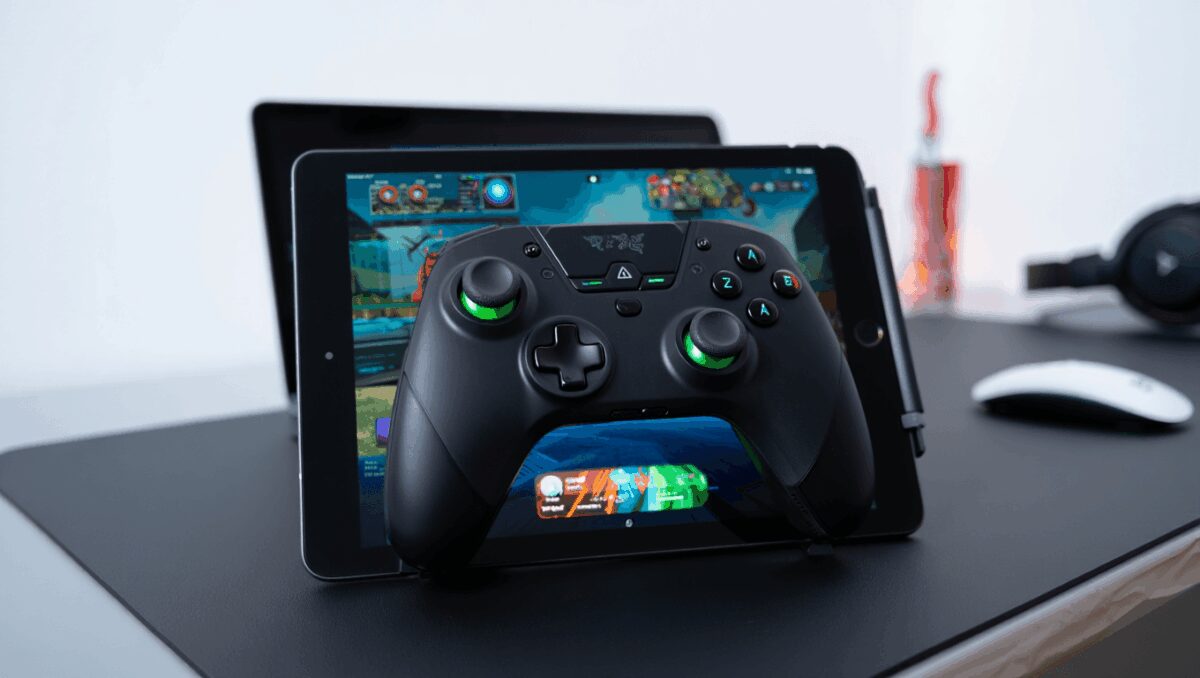
I recently spent several extended sessions with Razer’s Kishi V3 Pro XL and found it turned an underused iPad into a surprisingly capable gaming platform — but not without compromises. For anyone who wants a true console-style controller that clamps around a tablet, this accessory delivers comfort and precision; whether it justifies its price depends largely on whether you need haptics on iPadOS.
Sony PS5 prices surge across all models: what consoles now cost
Xbox leak reveals Triton details: hints at first big moves from CEO Asha Sharma
The Kishi V3 Pro XL is a large, clamp-style controller that fits tablets up to 13 inches and connects via USB-C. Its selling points are obvious from the first minutes of play: full-size thumbsticks, analog triggers, extra programmable buttons and a passthrough charge port that keeps your tablet powered during long sessions. I tested the controller with cloud/remote-play and native tablet games to see how it performs under real-world conditions.
Quick takeaways
- What it is: A premium clamp controller for iPad and USB-C tablets designed to provide a console-like layout.
- Who should consider it: Gamers who prefer a handheld tablet setup with full-size sticks and triggers rather than propping a tablet up and using a separate gamepad.
- Big positives: Comfortable, durable-feeling grips; highly responsive TMR-based sticks; built-in passthrough charging; robust customization via app.
- Key drawbacks: Haptic feedback does not work on iPadOS despite the controller advertising advanced tactile features; price is at the high end for mobile controllers.
Wordle vs Parseword: weeklong trial uncovers whether the switch is worth it
Nvidia DLSS powers sharper, faster PC games: why players and developers are divided
What’s inside and how it feels
Out of the box the Kishi V3 Pro XL looks like a cross between a traditional gamepad and a tablet cradle. The grips are substantial and sculpted for long sessions; they evoke high-end console controllers more than the slim phone clips you often see. Even with a mid-size iPad inserted, the assembly felt balanced during marathon playtests — I didn’t get the hand cramps some thinner devices produce.
The package includes two sets of rubber bumpers to tailor the clamping fit and two thumbstick caps with different profiles. Swapping these is easy and gives a useful level of customization for individual hand sizes and play styles.
Performance highlights
Where the controller shines is input fidelity. The thumbsticks use Tunnel Magneto Resistance sensors — TMR — which pick up very small motions more cleanly than many other sensors. In practice that translated to steadier steering in racing tests and finer aim adjustments in shooters. I ran cloud-play sessions and native games to check for latency; the controller’s polling options (adjustable in the companion software) kept inputs tight and dependable.
Triggers are analog and feel more “mouse-like” than the click-only type found on some cheaper pads. The extra shoulder and rear buttons are clicky and convenient for remapping, letting you keep thumbs on the sticks while using middle fingers for secondary actions.
Software and battery
The Razer Nexus app is the configuration hub. It’s straightforward: remap buttons, tweak stick dead zones, flip trigger behavior between analog and digital, and change polling rate. The app also gathers installed games and shortcuts to services like remote-play — useful if you switch between local tablet titles and streamed console sessions.
Note that the controller does not have its own battery; it draws power from the tablet and therefore includes a USB-C passthrough port so you can charge the tablet while you play. For long outings or extended cloud-play sessions this is effectively essential and a feature I now consider mandatory on clamp controllers.
Specs at a glance
| Category | Kishi V3 Pro XL — key details |
|---|---|
| Retail price | $199 / £164 |
| Connection | Wired USB‑C (tablet-supplied power) |
| Tablet compatibility | iPad Pro (11″ & 13″), iPad Air (11″ & 13″), standard iPad (10.9″), Android USB‑C tablets |
| Thumbsticks | TMR sensors; swappable stick caps |
| Triggers | Full-size analog triggers |
| Extra buttons | Two rear, two shoulder programmable buttons |
| Haptics | Razer Sensa HD Haptics (works on Android; disabled on iPadOS) |
| Power | No internal battery; passthrough charging via USB‑C |
Where it trips up
The most consequential limitation for iPad owners is that the controller’s advanced tactile system is effectively unavailable on Apple devices. Razer markets the unit with “HD” tactile feedback, but when used on iPadOS that feature does not function; Android tablets do receive vibration and haptic sensations. This gap matters: haptics can meaningfully change immersion in action titles, and some buyers will return a product if they discover the feature is absent on their platform.
This omission is probably the single factor that makes the price harder to justify. At its sticker price the Kishi V3 Pro XL sits among premium mobile accessories; without haptics on iPads, the cost-to-feature ratio narrows, especially when lower-cost controllers or pairing a tablet with a standalone DualSense/DualShock remain practical alternatives.
Who should buy it — and who should wait
If you primarily game on Android tablets, or often use remote-play and want a one-piece handheld experience, the Kishi V3 Pro XL is one of the most polished options available. Its ergonomics and control precision are class-leading among clamp controllers, and passthrough charging removes a common pain point.
But if you’re anchored to an iPad and the presence of haptics matters to you, hold off. Consider whether using a standalone console/controller on a table or a cheaper clamp-style pad might meet your needs until a software fix or firmware update resolves the haptic limitation.
Bottom line
Razer has crafted a thoughtful, well-built tablet controller that significantly improves the feel and control of games on a tablet. The TMR sticks, full-size triggers and thoughtfully placed extra buttons make it a powerful tool for mobile gamers who want console-like inputs. However, the lack of haptic feedback on iPadOS and a near‑$200 price tag will steer some buyers to alternatives. For now, the Kishi V3 Pro XL is the best ergonomic clamp controller for a tablet — provided you can accept the iPad haptics caveat.

Annabelle Ink is a gaming journalist and lifelong gamer who lives and breathes video game culture. From console releases to esports tournaments, this dedicated journalist brings insider knowledge and genuine enthusiasm to every review and feature. Her expertise spans multiple gaming platforms, helping readers discover their next favorite game while staying connected to the pulse of the gaming industry.